Protect photos before sharing
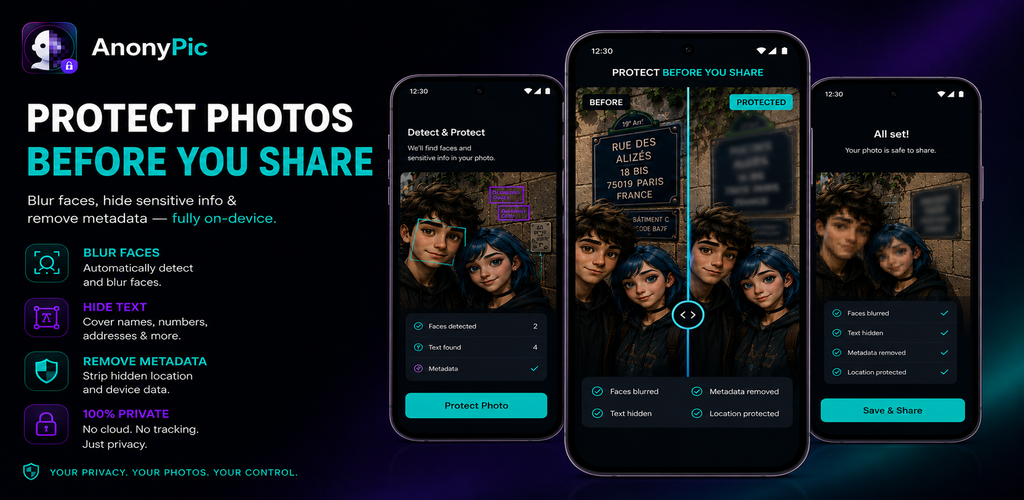
A photo can unintentionally reveal faces, names, addresses, numbers, documents, screens, location information or hidden metadata. AnonyPic provides a careful review step before a protected copy is saved or shared, without using fear-based prompts or making automatic detection guarantees.
What AnonyPic can protect
Blur faces
Reduce unwanted identity exposure by blurring faces before sharing.
Hide sensitive text
Cover names, numbers, addresses and other visible information that should not appear in a shared image.
Remove metadata
Remove hidden photo metadata that may contain device or location-related information where present.
On-device processing
Privacy edits are designed to happen on the device rather than requiring photo uploads to a cloud service.
Who AnonyPic is for
- Social media users who review photos before publishing.
- Parents, families and travelers protecting people or location details.
- Creators and professionals sharing screenshots, documents or photos.
- Anyone who wants a deliberate privacy check before sharing an image.
How to use AnonyPic
- Select a photo and review possible privacy-sensitive areas.
- Blur each face that should be protected.
- Hide visible sensitive text, names, numbers or addresses.
- Remove metadata where appropriate.
- Review the protected result before saving or sharing the copy.
Tips before sharing a photo
- Zoom in and inspect the entire frame, including background documents and screens.
- Check visible names, numbers and addresses.
- Verify every face that should be protected.
- Review the final image before sharing it publicly.
Privacy-first processing
AnonyPic requires no account and is designed to protect photos on the device without a required cloud upload. TSI Dev Studio does not intentionally receive the user’s photo content; saving and sharing remain explicit user actions.
Clear privacy information
Read the dedicated policy before the public release.